Blog Page

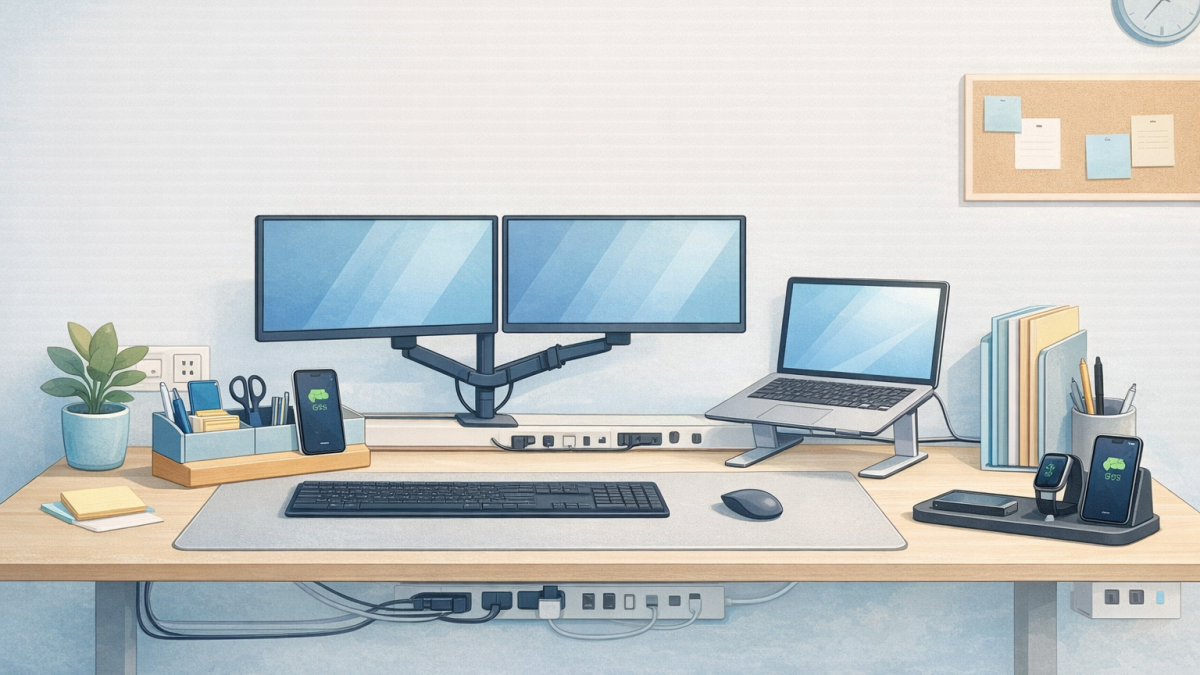
Must-Have Desk Accessories for a Clutter-Free Office

<section>
<p>
Stacks of paper, tangled cords, scattered supplies, and limited surface space create daily friction that affects
concentration and productivity. In today’s fast-paced work environment, organization isn’t optional — it’s strategic.
</p>

<p>
Whether you’re outfitting a single office or refreshing an entire department, the right desk accessories can dramatically
improve efficiency and focus. Below are the must-haves that support a cleaner, more productive workspace.
</p>
</section>

<section>
<h2>1. Monitor Arms &amp; Screen Mounts</h2>
<p>
Traditional monitor bases consume valuable desk space and often position screens too low, leading to neck and shoulder strain.
Adjustable monitor arms help:
</p>
<ul>
<li>Free up surface area</li>
<li>Improve ergonomic alignment</li>
<li>Allow flexible positioning</li>
<li>Create a modern, streamlined appearance</li>
</ul>
<p>
For dual-screen users, articulated mounts enhance workflow while keeping desks uncluttered.
</p>
</section>

<section>
<h2>2. Laptop Stands &amp; Docking Solutions</h2>
<p>
Laptops placed flat on desks contribute to poor posture and inefficient cable use. Elevating devices to eye level improves comfort
and creates usable space underneath for storage or accessories.
</p>
<p>
Pair a laptop stand with a clean docking station to reduce visible wires and simplify connectivity.
</p>
</section>

<section>
<h2>3. Cable Management Systems</h2>
<p>
Few things disrupt visual clarity more than cable clutter. Under-desk trays, adhesive cable clips, grommets, and wire sleeves
create an immediate improvement.
</p>
<p>
Better cable management doesn’t just improve aesthetics — it enhances safety and makes troubleshooting easier.
</p>
</section>

<section>
<h2>4. Drawer Dividers &amp; Desktop Organizers</h2>
<p>
Pens, sticky notes, paper clips, chargers — small items easily accumulate. Structured drawer dividers prevent items from shifting
and becoming disorganized. Desktop organizers keep essentials accessible without taking over primary work areas.
</p>
<p>
When everything has a place, work flows more smoothly.
</p>
</section>

<section>
<h2>5. Vertical File Systems</h2>
<p>
Stacks of paper consume valuable horizontal space. Vertical file organizers or slim document trays use height instead of surface
area to keep priority documents accessible without overwhelming the desk.
</p>
</section>

<section>
<h2>6. Charging Stations &amp; Device Hubs</h2>
<p>
Modern offices rely on multiple devices — phones, tablets, headsets, and laptops. Consolidated charging stations reduce tangled
cords and centralize power access. Wireless charging pads can further eliminate visible cables.
</p>
<p>
Technology should support productivity, not complicate it.
</p>
</section>

<section>
<h2>7. Desk Mats &amp; Defined Work Zones</h2>
<p>
A quality desk mat defines workspace boundaries and creates a cleaner aesthetic. It also protects surfaces and anchors keyboards
and mice in a structured layout. Small visual cues help maintain order.
</p>
</section>

<section>
<h2>8. Minimalist Storage Solutions</h2>
<p>
Low-profile storage cabinets or rolling pedestals keep less frequently used materials off the main surface while remaining
accessible. The goal isn’t to remove functionality — it’s to remove clutter.
</p>
</section>

<section>
<h2>Why Desk Organization Matters More Than Ever</h2>
<p>
In hybrid environments, desks often serve multiple functions — collaboration, focused work, virtual meetings, and device management.
A disorganized desk creates friction at every stage:
</p>
<ul>
<li>Searching for materials wastes time</li>
<li>Poor ergonomics reduces comfort</li>
<li>Visual clutter increases stress</li>
<li>Inefficient cable management limits flexibility</li>
</ul>
<p>
Conversely, a well-organized desk encourages focus, improves posture, enhances professional appearance, reduces distractions,
and supports long-term productivity.
</p>
</section>

<section>
<h2>Small Changes, Measurable Impact</h2>
<p>
A clutter-free office doesn’t require a full renovation. Strategic upgrades often deliver immediate improvements:
</p>
<ul>
<li>Install monitor arms</li>
<li>Add drawer dividers</li>
<li>Implement cable trays</li>
<li>Introduce charging hubs</li>
<li>Use vertical storage</li>
</ul>
<p>
These incremental changes improve workflow without major disruption.
</p>
</section>

<section>
<h2>Organization as a Competitive Advantage</h2>
<p>
For businesses welcoming clients into their space, organization communicates competence and professionalism. Internally, it sends an
equally important message: <em>“We value efficiency and your ability to work effectively.”</em>
</p>
<p>
The right desk accessories are not cosmetic additions — they are productivity tools. When thoughtfully selected and implemented,
they transform everyday workspaces into focused, efficient environments.
</p>
<p>
A clutter-free office isn’t about minimalism for its own sake. It’s about removing obstacles so teams can perform at their best —
and in 2026, performance is everything.
</p>
</section>

The Future of Workspaces: Designing for Productivity

In 2026 and beyond, productivity won’t simply be about working harder — it will be about designing smarter environments.

The modern workplace is undergoing a quiet but profound transformation.

Gone are the days when rows of desks and fluorescent lighting defined productivity. Today’s workforce expects more — and organizations that respond thoughtfully are seeing measurable gains in performance, collaboration, and retention.

Designing for productivity in 2026 means understanding that workspace is strategy.

Productivity Is Influenced by Environment

Research consistently shows that physical workspace impacts focus, creativity, and efficiency. Poor lighting, uncomfortable seating, noise distractions, and inflexible layouts drain energy and reduce output.

Conversely, well-designed environments can:

  • Reduce fatigue
  • Improve collaboration
  • Enhance concentration
  • Support physical health
  • Increase overall morale

Workspace design is no longer aesthetic — it’s operational.

The Rise of Hybrid and Flexible Design

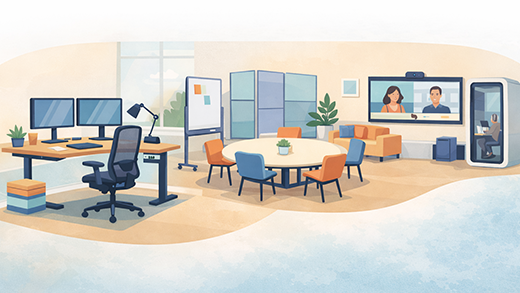
Hybrid work has reshaped how offices function. Fewer people may be present at any given time, but expectations for collaboration are higher.

Forward-thinking offices now incorporate:

  • Shared touchdown spaces
  • Reservable desks or hoteling systems
  • Flexible conference rooms
  • Multi-use collaboration zones
  • Private focus rooms

Instead of assigning every employee a fixed desk, many organizations are prioritizing adaptability. Modular furniture systems, mobile tables, and movable partitions allow teams to reconfigure space quickly.

Flexibility equals efficiency.

Ergonomics: The Foundation of Sustainable Productivity

Comfort is not a luxury — it’s essential infrastructure.

Quality ergonomic seating, adjustable-height desks, monitor arms, and proper keyboard positioning significantly reduce strain. Over time, this translates into fewer workplace injuries, reduced absenteeism, and improved sustained concentration.

An employee distracted by discomfort cannot perform at their best.

Investing in ergonomic solutions is investing in long-term performance.

Designing for Focus in a Distracted World

Open offices brought collaboration — but also noise.

Today’s productive workspace balances openness with intentional quiet zones. Acoustic panels, privacy pods, sound-masking systems, and dedicated focus rooms help mitigate distraction without sacrificing teamwork.

The future office is not louder. It is smarter.

Technology Integration Is Non-Negotiable

Workspaces must support technology seamlessly.

Conference rooms require integrated video systems. Workstations need accessible power and cable management. Charging hubs, shared screens, and collaboration tools must feel intuitive.

When technology works effortlessly within the environment, productivity increases naturally. When it does not, frustration grows.

Employee Experience Drives Retention

The competition for talent remains strong. Workplace experience influences recruitment and retention more than ever before.

Natural light, biophilic elements, modern finishes, comfortable seating areas, and thoughtfully designed break rooms communicate something powerful:

“We value your work — and your well-being.”

This perception matters.

Organizations that invest in environment often see improved engagement and stronger workplace culture.

Small Changes Can Deliver Big Impact

Redesigning an entire office is not always necessary.

Incremental improvements can create meaningful results:

  • Replacing outdated task chairs
  • Updating lighting in high-use areas
  • Redesigning a conference room for better collaboration
  • Adding acoustic solutions to reduce distraction
  • Introducing sit-stand desks in key departments

Strategic upgrades often outperform large, unfocused renovations.

The Workspace as a Business Tool

The most successful organizations recognize that workspace is not overhead — it is infrastructure.

A thoughtfully designed office supports workflow, enhances employee satisfaction, and aligns with company goals. It reduces friction. It increases efficiency. It strengthens brand perception internally and externally.

In 2026 and beyond, productivity will not simply be about harder work — it will be about smarter environments.

Designing for productivity requires intention. It requires listening to how teams actually work. And it requires partners who understand how furniture, layout, ergonomics, and technology intersect.

The future of workspaces is not about trends.

It is about performance.

And the organizations that design for it will lead the way.

Want help evaluating your workspace? Even small improvements can create measurable gains in comfort, collaboration, and productivity. Reach out to discuss a practical plan for your office.

How a Quality Office Chair Can Prevent Back Problems

In today’s digital world, many professionals spend more than eight hours a day seated. While technology has made remote and office work more efficient, it has also brought a surge in posture-related back problems. The culprit? More often than not, it’s the chair you’re sitting in.

The Importance of Ergonomic Seating
A quality office chair is more than a piece of furniture — it’s a tool for maintaining spinal health. Unlike generic chairs, ergonomic models are designed to support your body’s natural alignment, preserving the delicate “S” shape of your spine.

Poor posture can lead to uneven pressure on spinal discs, tightness in back muscles, and even nerve compression. Over time, this discomfort can become chronic, leading to reduced mobility and fatigue.

Anatomy of a Supportive Chair
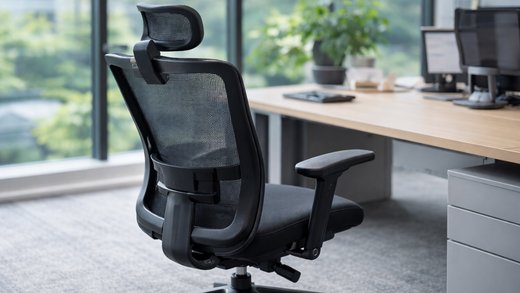
Here’s what to look for in a truly supportive chair:

Adjustable seat height: Your feet should rest flat, with knees bent at roughly 90 degrees.
Lumbar support: The lumbar curve ensures your lower spine stays naturally aligned.
Seat depth adjustment: Prevents excessive pressure behind your knees and supports your thighs evenly.
Adjustable armrests: Keeps shoulders relaxed and prevents wrist strain.
Tilt function: Allows movement that reduces stiffness from static sitting.
Each feature encourages a neutral sitting posture — one where your spine, shoulders, and hips align properly, minimizing fatigue.

Movement Matters
Even with the best chair, static posture can still cause problems. Micro-movements throughout the day — leaning back, adjusting your angle, or taking quick standing breaks — increase circulation and decrease joint stress. A premium office chair’s flexibility promotes this subtle motion, keeping your muscles active even while seated.

Long-Term Benefits of a Quality Chair
Less pain and stiffness: Continuous support prevents spinal misalignment.
Higher productivity: Comfort reduces distraction and boosts focus.
Longevity of spinal health: Early prevention wards off chronic pain later in life.
Improved mood and energy: Physical comfort influences psychological well-being.
The Financial Wisdom of Investing in Comfort
While high-end ergonomic chairs may seem costly at first, they often last longer and provide healthier working conditions. Think of it as investing in your daily comfort — and in avoiding costly chiropractor visits or missed workdays.

Ergonomics Beyond the Chair
Your chair is central, but complete back health also depends on your workspace setup. Keep your monitor at eye level, place your keyboard so elbows remain at 90 degrees, and ensure your lighting reduces screen glare. Small adjustments amplify your chair’s benefits and encourage better posture overall.

Final Thoughts
Sitting is unavoidable for most of us — but suffering from back pain doesn’t have to be. A high-quality office chair transforms how your body feels and functions throughout your workday. By supporting your spine’s natural shape and encouraging movement, it protects you from the pains that so many desk workers accept as “normal.”

Your chair isn’t just where you sit — it’s where you spend thousands of hours building your career. Make sure it’s supporting you in every way possible.

Felt Panel
Progress as Promised
PCI + Moseley's

Kudos to Performance Contracting for these beautiful office spaces. With the combination of Moseley's desking and Kirei acoustical wall, these spaces turned out fantastic!!!